JSON から Anki デッキを生成・更新する
JSON にある生物学の問題を3問読み込み、共通の画像と音声を追加して、初回配布用の APKG と、解答だけを変更した検証済みの更新版を出力します。どちらの版も ノート3件、カード3枚、メディアファイル2個になります。以下から SDK を1つ選んでください。各例はそのまま使える完全なプログラムです。通常のエクスポートに Anki のインストールは必要ありません。
管理:Anki Forge メンテナー · 英語原文の確認日:2026-10-25。
共通の入力ファイル
「共通の入力ファイル」のセクションv1.json、v2.json、cell.png、tone.wavをダウンロードします。画像は細胞の模式図です。音声は短い合成音で、単語の読み上げではありません。新しく作るアプリケーションのディレクトリごとに、次の4ファイルを recipe/ に置きます。
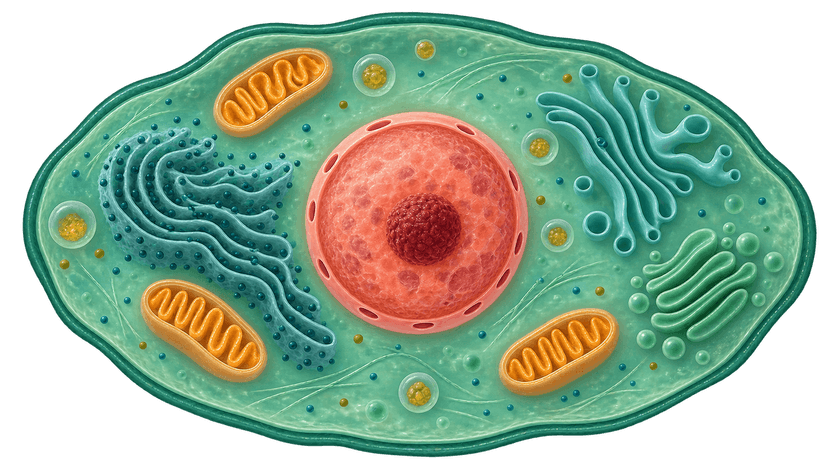
json-deck/ recipe/ v1.json v2.json cell.png tone.wav両方の JSON ファイルには namespace、deck と3件の notes があり、各ノートに継続して使う id、front、back が含まれます。v2 で変わるのは最初の回答だけです。JSON の解析は呼び出し側で行い、Anki Forge はノートの作成と APKG の生成を担当します。信頼できない入力を扱う場合は、ノートを作る前にアプリケーション側のスキーマで検証してください。
Rust
「Rust」のセクションRust 1.92 以降を使います。JSON の解析には serde と serde_json を使用します。Anki Forge は公開パッケージ 0.3.1 を使います。
cargo new json-deckcd json-deckcargo add ankiforge@0.3.1cargo add serde --features derivecargo add serde_json次のコードを src/main.rs に保存します。recipe/ は Cargo.toml と同じディレクトリに作成してください。
use ankiforge::update::CompareOptions;use ankiforge::{BuildOptions, Content, Media, Note, Project};use serde::Deserialize;use std::{fs, path::Path};
#[derive(Deserialize)]struct Dataset {    namespace: String,    deck: String,    notes: Vec<Row>,}
#[derive(Deserialize)]struct Row {    id: String,    front: String,    back: String,}
fn project(input: &Path, version: &str) -> Result<Project, Box<dyn std::error::Error>> {    let data: Dataset = serde_json::from_slice(&fs::read(input.join(version))?)?;    let image = Media::file(input.join("cell.png"))?;    let audio = Media::file(input.join("tone.wav"))?;    let mut project = Project::new(data.namespace)?.default_deck(data.deck);    for row in data.notes {        let front = Content::sequence([Content::text(row.front), image.image(), audio.sound()]);        project.add(row.id, Note::basic(front, row.back))?;    }    Ok(project)}
fn main() -> Result<(), Box<dyn std::error::Error>> { let args: Vec<_> = std::env::args().collect(); let input = Path::new(args.get(1).map(String::as_str).unwrap_or("recipe")); let output = Path::new(args.get(2).map(String::as_str).unwrap_or("output/rust")); fs::create_dir_all(output)?; let baseline = output.join("v1.apkg"); let candidate = output.join("v2.apkg"); if baseline.exists() || candidate.exists() { return Err("Choose a fresh output directory; keep original releases".into()); } project(input, "v1.json")?.build(BuildOptions::to(&baseline))?; let next = project(input, "v2.json")?; let comparison = next.compare(CompareOptions::against(&baseline))?; fs::write( output.join("comparison.json"), serde_json::to_vec_pretty(&comparison.snapshot())?, )?; if !comparison.policy().allows_publication() { return Err("Comparison policy blocked publication; inspect comparison.json".into()); } let prepared = next.prepare_publication(BuildOptions::to(&candidate).update_from(&baseline))?; let review = prepared .report() .comparison() .ok_or("Missing update comparison")?; fs::write( output.join("review.json"), serde_json::to_vec_pretty(&review.snapshot())?, )?; if !review.policy().allows_publication() { return Err("Prepared candidate blocked; inspect review.json".into()); } let result = prepared.publish()?; println!("{}", result.artifact().path().display()); Ok(())}cargo run -- recipe output/rustPython
「Python」のセクション対応プラットフォームの wheel がある通常の CPython 3.11 以降を使います。リリースチェックの対象は 3.11–3.14 です。Windows では .venv\Scripts\Activate.ps1 で仮想環境を有効にします。Anki Forge は公開パッケージ 0.3.1 を使います。
mkdir json-deckcd json-deckpython -m venv .venv. .venv/bin/activatepython -m pip install ankiforge==0.3.1次のコードを main.py に保存し、同じディレクトリに recipe/ を作成します。
"""Generate and review an answer-only update from caller-parsed JSON."""import jsonfrom pathlib import Pathimport sysfrom ankiforge import BuildOptions, CompareOptions, Content, Media, Note, Project

def project(source: Path, version: str) -> Project:    data = json.loads((source / version).read_text(encoding='utf-8'))    image = Media.file(source / 'cell.png')    audio = Media.file(source / 'tone.wav')    result = Project(data['namespace'], default_deck=data['deck'])    for row in data['notes']:        front = Content.sequence([row['front'], image.image(), audio.sound()])        result.add(row['id'], Note.basic(front, row['back']))    return result

source = Path(sys.argv[1] if len(sys.argv) > 1 else 'recipe')output = Path(sys.argv[2] if len(sys.argv) > 2 else 'output/python')output.mkdir(parents=True, exist_ok=True)baseline, candidate = output / 'v1.apkg', output / 'v2.apkg'if baseline.exists() or candidate.exists(): raise RuntimeError('Choose a fresh output directory; keep original releases')project(source, 'v1.json').build(BuildOptions.to(baseline))next_project = project(source, 'v2.json')comparison = next_project.compare(CompareOptions.against(baseline))(output / 'comparison.json').write_text(json.dumps(comparison.snapshot(), indent=2), encoding='utf-8')if not comparison.allows_publication: raise RuntimeError('Comparison policy blocked publication; inspect comparison.json')prepared = next_project.prepare_publication(BuildOptions.to(candidate).update_from(baseline))try: review = prepared.report.comparison if review is None: raise RuntimeError('Missing update comparison') (output / 'review.json').write_text(json.dumps(review.snapshot(), indent=2), encoding='utf-8') if not review.allows_publication: raise RuntimeError('Prepared candidate blocked; inspect review.json') result = prepared.publish() print(result.artifact.path)finally: prepared.close()python main.py recipe output/pythonNode
「Node」のセクションNode.js 22.13 以降と、実行環境に合うネイティブの optional dependency が必要です。この例は TypeScript を JavaScript にコンパイルして Node.js で実行します。Anki Forge は公開パッケージ 0.3.1 を使います。
mkdir json-deckcd json-decknpm init -ynpm install --include=optional ankiforge@0.3.1npm install --save-dev typescript@6.0.3 @types/node@24.13.6次のコードを main.mts に保存し、同じディレクトリに recipe/ を作成します。
import { readFile, mkdir, access, writeFile } from 'node:fs/promises';import path from 'node:path';import { Project, Note, Content, Media, BuildOptions, CompareOptions } from 'ankiforge';
interface Dataset {  namespace: string;  deck: string;  notes: { id: string; front: string; back: string }[];}
async function project(source: string, version: string): Promise<Project> {  const data: Dataset = JSON.parse(await readFile(path.join(source, version), 'utf8'));  const image = await Media.file(path.join(source, 'cell.png'));  const audio = await Media.file(path.join(source, 'tone.wav'));  const result = new Project(data.namespace).defaultDeck(data.deck);  for (const row of data.notes) {    const front = Content.sequence([row.front, image.image(), audio.sound()]);    result.add(row.id, Note.basic(front, row.back));  }  return result;}
const source = process.argv[2] ?? 'recipe';const output = process.argv[3] ?? 'output/node';await mkdir(output, { recursive: true });const baseline = path.join(output, 'v1.apkg');const candidate = path.join(output, 'v2.apkg');for (const file of [baseline, candidate]) { const exists = await access(file).then(() => true, error => { if (error.code === 'ENOENT') return false; throw error; }); if (exists) throw new Error('Choose a fresh output directory; keep original releases');}const first = await (await project(source, 'v1.json')).build(BuildOptions.to(baseline));await first.artifact.close();const next = await project(source, 'v2.json');const comparison = await next.compare(CompareOptions.against(baseline));await writeFile(path.join(output, 'comparison.json'), JSON.stringify(comparison.snapshot(), null, 2));if (!comparison.policy.allows_publication) { throw new Error('Comparison policy blocked publication; inspect comparison.json');}const prepared = await next.preparePublication(BuildOptions.to(candidate).updateFrom(baseline));try { const review = prepared.report.comparison; if (!review) throw new Error('Missing update comparison'); await writeFile(path.join(output, 'review.json'), JSON.stringify(review.snapshot(), null, 2)); if (!review.policy.allows_publication) throw new Error('Prepared candidate blocked; inspect review.json'); const result = await prepared.publish(); console.log(result.artifact.path); await result.artifact.close();} finally { await prepared.close();}npx tsc main.mts --target ES2022 --module NodeNext --moduleResolution NodeNext --strict --outDir dist --types nodenode dist/main.mjs recipe output/node
出力を確認してインポートする
「出力を確認してインポートする」のセクション選んだプログラムは output/<language>/v2.apkg のパスを表示します。v1.apkg も一緒に保管してください。回答だけを変えた今回の編集では、comparison.json と review.json に RISK.NOTE_CHANGED が記録され、追加・削除されたノートはなく、policy.allows_publication: true になります。プログラムは公開前に、準備済み候補についてもポリシーを確認します。どちらかの版が出力先ディレクトリに存在する場合、そのディレクトリは再利用しません。
まず v1.apkg を Anki にインポートします。Biology デッキに Basic カードが3枚あり、細胞の画像と合成音が含まれていることを確認します。次に v2.apkg をインポートし、最初の回答が「The basic structural and functional unit of life」になり、ノート数は3件のままであることを確認します。biology-json という名前空間がこの配布プロジェクトを識別します。各業務 ID がノートの安定キーとなり、Anki Forge はその識別情報から Anki 用の GUID を生成します。名前空間と3つのキーは変更しないでください。
更新の基準には、配布時のオリジナルの v1 APKG を使います。Anki から再エクスポートしたファイルは使えません。クライアント側のインポート時の照合、ローカルでの編集、学習スケジュールへの影響は、Anki のバージョン、ノートタイプ、インポート設定によって変わります。リリース前に対象クライアントで検証してください。後のパッケージで省かれたノートも、インポートだけでは削除されません。compare/build の成功は、すべての学習者の復習状態を保証するものではありません。